MCP in practice: 22 real-world
examples for every stage
of the sales pipeline

Kelly Carrow
9/2/2026
CRM

Imagine having a new colleague on your team. They don't eat, sleep, or waste time at the water cooler. During the morning rush, they can dig through your entire database history in three seconds, update open proposals, or reschedule your calendar for the whole week. That is exactly what an AI tool connected to Raynet via MCP (Model Context Protocol) can do.
While the built-in Raynet AI button helps you summarize meeting notes or draft emails directly inside the app, an MCP connection gives external AI tools (like Claude) full authorization to read, create, and edit data across your entire CRM.
We've put together a lineup of practical, real-world sales scenarios showing what this powerhouse combo can handle.
💡 Before we get started…
The prompts below should serve as inspiration and we don’t recommend copying them word for word. We tested them ourselves in ChatGPT, but different AI models have their own nuances and may sometimes require slightly more detailed input. If the AI agent doesn’t understand you the first time, just tweak the prompt in the chat. With each subsequent attempt, you will gain practice and soon learn how to get the most out of the connection.
Leads & Prospecting
1. Sourcing new leads
Scenario: You have a specialized product and need to reach top companies in your region, but you don't want to waste hours doing tedious research, browsing websites, and manually entering contact details into your CRM.
Prompt for AI agent: "Find 5 top IT companies in my region. Extract their available contact details from the web and add them directly to the CRM as new Leads."
What AI via MCP does: Scours the web, gathers contact info, checks for duplicates in the CRM, creates Lead cards in Raynet, and saves you an hour of manual data entry.
2. Lead qualification & fair Round-Robin distribution
Scenario: A wave of new leads just arrived from a form submission or event. You need to qualify them and split them fairly among the sales reps.
Prompt for AI agent: "We got some new leads in the CRM today. Convert them into Accounts, create Deals for each, and use a Round-Robin workflow to split them evenly among Martin carp, Charlie Orca, and Rudolph Fisher. Also, schedule a Call activity titled 'Discovery Call' for every Deal."
What AI via MCP does: Runs a rotation across reps, updates the Owner field, converts selected records into Accounts, creates Deals instantly, and schedules the follow-up calls.
Accounts & Contacts
3. Creating a new Account and Contact in a single step
Scenario: You just returned from a meeting with a business card from a new prospect and need to log them into the CRM immediately with all proper connections attached.
Prompt for AI agent: "Create a new Account named 'TechSolutions LLC.' (Status: Prospect, Rating: A, Role: Buyer) and immediately add John Grey as a contact person with email grey@techsolutions.com and phone +1 777111 222."
What AI via MCP does: Generates a new company record with all necessary parameters and instantly links a newly created contact profile complete with details.
🌊 Raynet AI tip
To log contacts even faster, use the Business Card/LinkedIn profile Scanner feature in the mobile app or Email Signature Scanner on the desktop version.
4. Fast meeting prep
Scenario: You have a meeting with a client in an hour and don't have 20 minutes to click through old notes. You need a quick summary of what matters most.
Prompt for AI agent: "I have a meeting in an hour with Marcel from Big Company LLC, scan our full interaction history in the CRM – open Deals, recent Quotes, Projects, and past Activities – and give me a 5-bullet summary: what we discussed last time, where things are stuck, and what to watch out for."
What AI via MCP does: Searches the entire Account record and linked data, delivering key insights in seconds without you having to read through dozens of entries.
🌊 Raynet AI tip
360° Summary directly on the Account card
Need a quick overview without opening an external AI chat? Use the native feature in Raynet. On the company record, click the Raynet AI button and select 360° Summary. The system pulls the vital highlights from your entire history instantly. No prompt writing required.
5. Account handovers during rep transitions
Scenario: A sales rep is changing territories or leaving the company, and you need a smooth handoff of their accounts and open deals to a new colleague.
Prompt for AI agent: "Find all Accounts and open Deals owned by Peter Waters. Reassign ownership to Jane Fin, and schedule a 1-hour joint 'Account Handoff' meeting for Jane and Peter on Sept 20 at 10 AM."
What AI via MCP does: Queries the outgoing rep’s entire database, changes the assigned owner across accounts and open opportunities, and puts the handoff meeting on their calendars.
6. ABC Analysis & VIP Account Management
Scenario: You want to ensure your team gives VIP treatment to key revenue drivers and verify that touchpoints are scheduled.
Prompt for AI agent: "Run an ABC analysis on won deals this year. Pull Category A companies and check if we have a meeting scheduled with them this month. If not, create a task titled 'Schedule Quarterly Review' for each Account Owner."
What AI via MCP does: Calculates revenues, flags key VIP clients, audits planned touchpoints, and auto-assigns tasks for reps to book meetings where contact is missing.

7. Smart Upsell & Reactivating Cold Accounts
Scenario: You want to spark deal activity with existing clients who used to buy heavily but haven't engaged recently.
Prompt for AI agent: "Find all CRM Accounts with closed Deals over $10,000 last year that have had zero new Deals or planned Activities in the last 6 months. For each one, create a 'Year-End Follow-up' task for next week and assign it to the original rep."
What AI via MCP does: Cross-references Deal and Activity history, filters out dormant accounts, and batch-creates follow-up tasks for reps.
8. Targeted Cross-selling based on product analytics
Scenario: One of your core products is performing well, and you want to offer it to clients who bought an add-on service in the past but don't own the main product yet.
Prompt for AI agent: "Analyze product sales over the past year. For companies with a Won Deal for Product A but no history with Product B, create a task titled 'Offer Product B Cross-sell' for their assigned rep."
What AI via MCP does: Scans purchase history across all clients, identifies perfect cross-sell targets, and populates reps' task lists in CRM with targeted outreach assignments.
9. Tailored email drafts
Scenario: You want to re-engage a key contact you haven't spoken to in a while without sending a generic template.
Prompt for AI agent: "I haven't talked to Martin Smith at Auto LLC in a while. Review our full interaction history in the CRM and draft an email that picks up where we left off and reignites his interest in our services."
What AI via MCP does: Reads past conversations and deal context, crafting a personalized, natural-sounding draft tailored specifically to that contact.
🌊 Raynet AI tip
Draft emails inside the CRM
Need a fast draft while working in Raynet? No need to launch an AI chat window. Right inside the email or Activity view, click the Raynet AI button. Give it a brief prompt, and it will generate a professional message in seconds for you to review and send.
Limitation:
Raynet's MCP cannot send emails directly out of Raynet natively yet, but connecting your AI tool to Gmail expands your MCP setup to handle email communications smoothly.
Deals & Quotes
10. Automated quote expiration checker
Scenario: You've sent out dozens of proposals that are nearing expiration without feedback from prospects.
Prompt for AI agent: "Find all sent, open Quotes expiring within the next 3 days. For each, schedule a Call activity titled 'Quote Expiration Follow-up' for the Owner tomorrow morning at 9 AM."
What AI via MCP does: Checks expiration dates on open proposals and places follow-up calls linked directly to the client and deal straight into reps' calendars.
11. Handoff from Closed-Won to Fulfillment
Scenario: A rep just closed a deal and needs to pass the account to ops/fulfillment seamlessly without manual data re-entry.
Prompt for AI agent: "Move the Deal for Auto LLC to 'Closed-Won'. Create a new Sales Order for the same value, set up a new Project in CRM called 'Fulfillment – Auto LLC', and assign a 'Client Kickoff Meeting' task to [Colleague's Name] for this Friday."
What AI via MCP does: Updates the Deal status, creates the Sales Order, builds the Project, and schedules the onboarding task for the fulfillment team in one single execution.
12. Pipeline audit & cleanup
Scenario: Your pipeline is cluttered with dozens of open deals. Half of them haven't moved in months, skewing your revenue forecasts.
Prompt for AI agent: "Analyze open Deals and flag any that have been inactive without upcoming Activities. For any deal with no activity in over 60 days, bulk update their status to 'Closed-Lost'."
What AI via MCP does: Flags stale deals, recommends closing them out, and bulk updates their stage to Lost upon your command.
Activities & Calendar
13. Frictionless post-meeting notes
Scenario: You just finished a call or walked out of a meeting and don't want to waste time clicking around to set up tasks or update deal values manually.
Prompt for AI agent: "Just wrapped a call with new lead [Name / Company]. Deal value is around $39,000 with an estimated close date of Dec 10, 2026. Create a Deal for this and schedule an Activity titled 'Call to send proposal' for Wednesday at 11:00 AM."
What AI via MCP does: Takes dictated or free-form text, creates a new Deal with estimated value, and slots the follow-up task straight into your calendar.
🌊 Raynet AI tip
Single-click meeting summaries
Want to clean up chaotic meeting notes or dictate fresh thoughts from your phone? Click the Raynet AI button in the Meeting Outcome field. It converts raw notes into a structured summary with key takeaways instantly.
14. Bulk calendar rescheduling
Scenario: Unexpected time off or travel wiped out your day or week, and you need to shift all meetings and tasks at once.
Prompt for AI agent: "Reschedule all my Activities from [Date] to next week. Find open slots in my calendar and distribute them where there's room."
What AI via MCP does: Scans your schedule, finds open windows in the coming week, and updates dates across all affected activities in bulk.
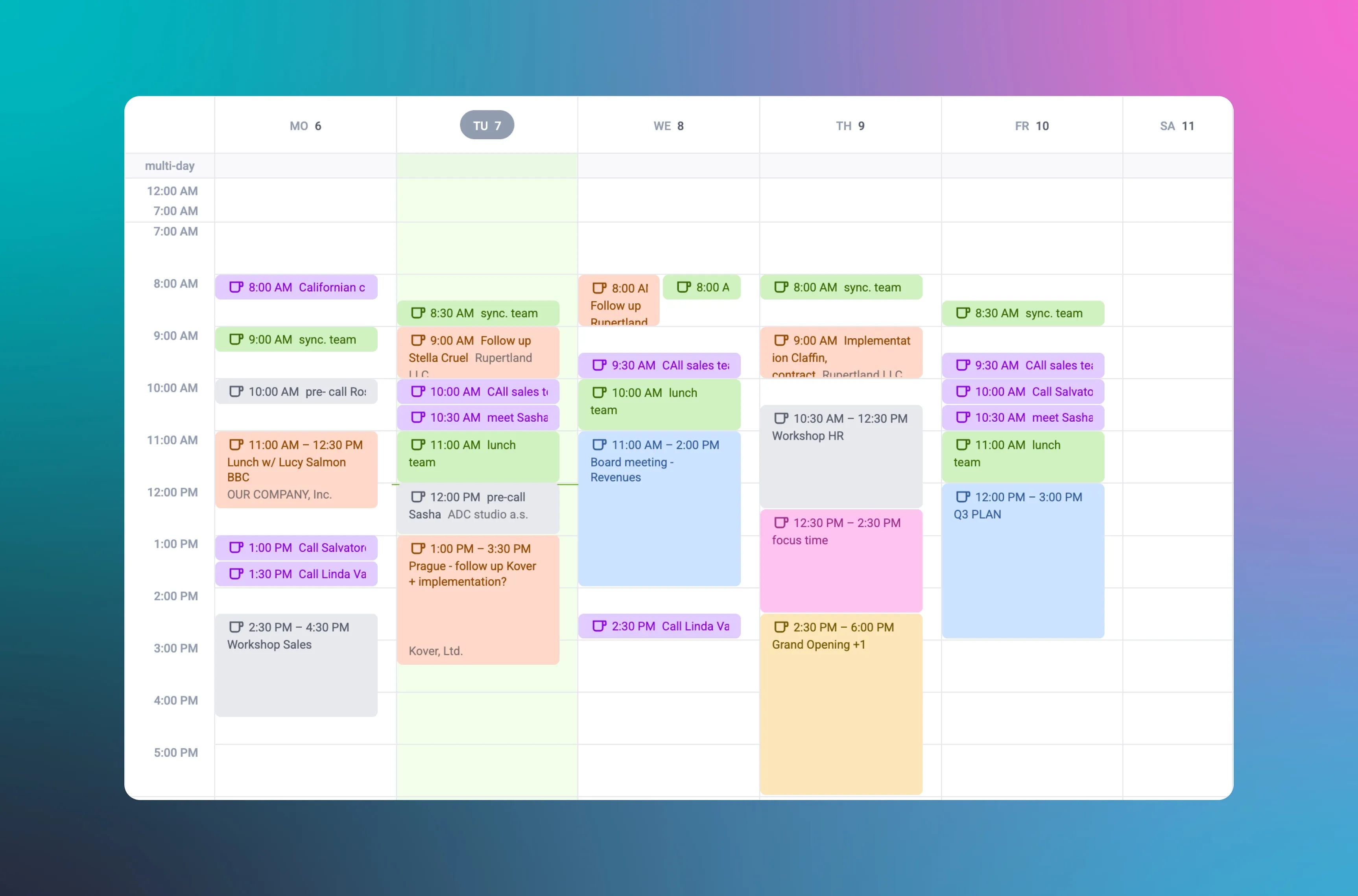
15. Overdue task and deadline checker
Scenario: After an intense week on the road, overdue tasks are piling up in your CRM, making it hard to prioritize what's urgent.
Prompt for AI agent: "Find all my incomplete Tasks with deadlines up to yesterday. Reschedule high-priority tasks for today starting at 9:00 AM, and push the rest to this Friday at 3:00 PM."
What AI via MCP does: Reviews overdue tasks, sorts them by priority, and automatically updates deadlines so you get a realistic, clean schedule immediately.
Projects
16. Project health & deadline checker
Scenario: You're managing multiple client deliveries at once and need visibility into which projects are running smoothly versus which ones are falling behind.
Prompt for AI agent: "Check all active Projects in the CRM and compare them against scheduled Activities. Highlight projects that have no activities planned for this week or are nearing completion without key tasks marked done."
What AI via MCP does: Audits Projects and linked Activities, providing a list of high-risk projects that need immediate attention.
17. Auto-creating Projects from Deals & scheduling kickoffs
Scenario: A rep closes a deal and needs to initiate project kickoff instantly.
Prompt for AI agent: "Move Deal 'Solar Delivery - Logistika a.s.' to Won. Create a new Project called 'Solar Implementation - Logistika a.s.' linked to this deal, and schedule a 'Kick-off meeting' for Thursday at 10:00 AM."
What AI via MCP does: Marks the deal as won, generates a project card with all account and deal links intact, and adds the kickoff meeting to the team calendar.
Reports, Analytics & Process Optimization
18. Sales process improvement recommendations
Scenario: You want to understand why certain deals close fast while others drop off so you can coach your team.
Prompt for AI agent: "Find Deals over $XY that closed quickly with client profiles and AI Lead Scores similar to our new lead from Auto s.r.o. Suggest an Activity cadence we should replicate for success. Also, pull the stage where deals drop to Closed-Lost most often and recommend improvements."
What AI via MCP does: Analyzes win/loss patterns, builds a proven playbook for new leads, and identifies friction points in your sales pipeline.
🌊 Raynet AI tip
AI Lead Scoring
Want to know which lead is most likely to convert without prompting an external AI? Raynet has AI Lead Scoring natively built in. It analyzes your data against your Ideal Customer Profile (ICP) and assigns percentage scores automatically.
19. Weighted Sales Forecast & Win Probability adjustments
Scenario: End-of-month is approaching, and leadership needs an accurate revenue projection based on real pipeline status.
Prompt for AI agent: "Generate a weighted sales forecast for next month. For deals set to close next month currently in the 'Final Negotiation' stage, update their win probability to 80%."
What AI via MCP does: Scans your pipeline, updates deal probabilities in specified stages to 80%, and calculates a refreshed weighted forecast.
20. Profitability audit & low-margin deal detection
Scenario: Sales volume is up, but margins are shrinking. You need to inspect closed deals and spot any sold near zero profitability.
Prompt for AI agent: "Show all Won Deals from this year sorted by lowest margin. For any deal with a margin below 10%, create a 'Cost Structure Audit' task for the assigned Account Owner."
What AI via MCP does: Evaluates financial performance across closed deals, ranks them by true profitability, and triggers task assignments for deals below margin thresholds.
21. Activity vs. Revenue comparison report
Scenario: As a VP of Sales, you want to evaluate reps' activity volume versus their actual closed revenue.
Prompt for AI agent: "Pull completed activity counts (tasks, meetings, calls) by sales rep for this month and compare them against their total won deal volume."
What AI via MCP does: Extracts rep effort metrics, correlates them with closed revenue stats, and delivers a clear picture of which sales activities drive actual revenue.
22. Custom reports
Scenario: Management requests a hyper-specific conversion report, but you don't want to spend hours manipulating data manually in Excel.
Prompt for AI agent: "Build a custom conversion report for our Deals over the past year categorized by client industry. Include a visual chart and pull out 3 main insights on where we performed best."
What AI via MCP does: Extracts CRM analytics, compiles them into a clean report complete with charts, and eliminates manual spreadsheet work.
Don't have Raynet yet, but are you interested in connecting via the MCP server? 🤩
Try Raynet free for 30 days

Schedule a Raynet CRM consultation

Sales Tips and Tricks in Your Inbox
A collection of sales insights, tips, and best practices for CRM and sales.
When Kelly isn’t polishing the English version of the Raynet app, she’s probably timing exactly how long it takes to create a deal in a competitor's CRM. After 4 years at Raynet, she knows that organized sales data isn't science fiction, and thanks to detailed market testing, she knows all about the strengths and weaknesses of both local and global players.